
In windows 7 you may have issues with machine hangs, crashes when the system is under extreme load. If you go to control panelControl Panel is part of Windows Operating Systems. It allows the user access to many “applets” that allow the user to setup and configure various parts of the operating system. These applets are grouped into different sections such as “System and Security” and “Hardware and Sound”. Sometimes 3rd part applets are installed into the control panel. Most of these applets can be run by going to “run” and entering the app.cpl. Cpl is the extension to control panel applets. Here are examples or control panel applets. Accessibility Options access.cpl Add or Remove Programs appwiz.cpl Display Properties desk.cpl Windows Firewall firewall.cpl Add Hardware hdwwiz.cpl Internet Options inetcpl.cpl Regional & Language Options intl.cpl Java Control Panel javacpl.cpl Game Controllers joy.cpl Mouse Properties main.cpl Sound & Audio Device Settings mmsys.cpl Network Connections ncpa.cpl Wireless Network Setup Wizard netsetup.cpl User Accounts nusrmgr.cpl ODBC Data Source Administrator odbccp32.cpl Power Options powercfg.cpl System Properties sysdm.cpl Phone and Modem Options telephon.cpl Time and Date Options timedate.cpl Windows Security Center wscui.cpl Automatic UpdatesAutomatic Updates is a service offered by Microsoft to update Microsoft products with the latest patches, features and security updates. In earlier OS`s the system was web based only, you went to the update website such as www.windowsupdate.com and the site scanned your system for required patches. Windows 2000 sp3 and Xp used Background Intelligent Transfer Service to update without any user input, In later OS`s the pc or server polls the update server ( be it either a local WSUS Server or Microsoft’s update server ) to see if there are any updates to the operating system or applications running on the system. If so it will download and install them. The system is fully configurable, you can specify dates it will poll the server for updates, whether it will notify of updates and wait for you to run them or it can be set to fully automated and download, configure and install them all automatically. In Windows 7 and Vista, when the system has update it will initiate a countdown until it automatically reboots and completes the update process. You can catch this countdown and extend it if required.
wuaucpl.cpl Active Directory Manager admgmt.msc
> Admin Tools > Event Viewer, under the system log you may see the error below.
Event ID-41 Source-Kernel Power Log-System
This is a well known issue in Windows 7 sometimes it may be resolved with the latest service packA Service Pack is an update to software from the software vendor. Usually a Service Pack is a combination of individual udates that have been released over time, installing in one large service enables less downtime.Sometimes service packsA Service Pack is an update to software from the software vendor. Usually a Service Pack is a combination of individual udates that have been released over time, installing in one large service enables less downtime.Sometimes service packs will add new features to the product. will add new features to the product. but it can also be resolved by disabling the power management sub system.
IT Solution
So we will disable the windows 7 power management.
First right click on the battery or plugged in battery icon in the far right hand corner of the task tray.

windows 7 power
We are then going to select power options so we can modify the power profile. You will see you system has either pwer saver , balanced or performance as default. Mine is performance. ( by the way there is no reason why you would not always run it on performance, balanced is a pain in the backside when on battery as it runs cpu stepping meaning the cpu runs slower when on battery to save power ).
You will then need to click Change Power Plan settings on your chosen power profile.

Now that we are are in your chosen profile its just a case of settign everything to never.
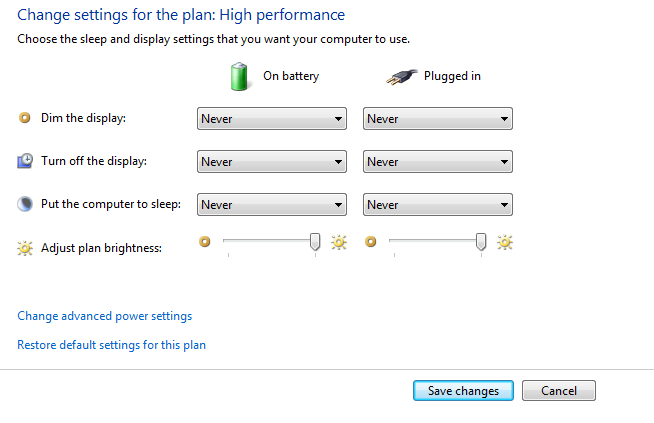
This now means that none of the default power management settgins are enabled. You could also change the default windows 7 shutdown options if required. If this does not resolve your issue consider running a windows 7 file repair.
Video Guide On how To Disable Windows Power Managment