


Exchange 2013/2016 Change OWA Log on Options
In Exchange 2013 and Exchange 2016 , by default the log on options for OWA are Domainname\Username, in Exchange 2010 we could change this in the ECP, this functionality is currently not in the Exchange 2013 ECP, so we must use power shell. In the example below we change it so OWA authentication is user name and password only and also so that a user can log into Exchange with their email address.These commands also apply to Exchange 2010.
Before

owa 2013 log-on options
Powershell to Change OWA Authentication to User Name
Set-OwaVirtualDirectory "owa (Default Web Site)" -LogonFormat Username -DefaultDomain techieshelp.local
iisreset
With the command above we set Exchange 2013 or Exchange 2016 OWA to be user name only.Then restart IIS for the changes to be effective.
After
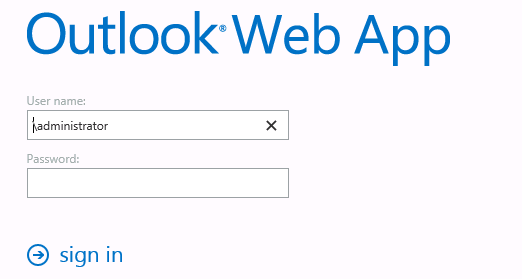
Exchange 2013 OWA Username only
Powershell to Change OWA Authentication to Email Address
Set-OwaVirtualDirectory "owa (Default Web Site)" -LogonFormat PrincipalName
iisreset
In the example above we set Exchange 2013/2016 OWA to log in as Email Address (Principal Name ).Then restart IIS to enable the changes.
After

log into owa with email address
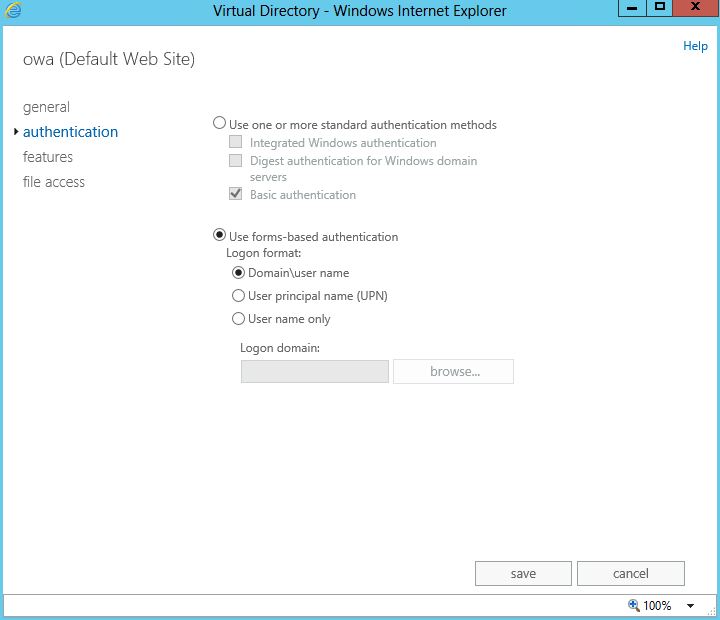
Change OWA Authentication Exchange 2013 and Exchange 2016 in the ECP
This can also obviously be done via the Exchange 2013 ECP also . To do so open up the ECP and select Servers > Virtual Directories > OWA. Then select Edit and you will see the options as seen below.

 Loading ...




Tony Simek
| #
Another great article, and this one worked well for me! Thank you!! Allen, when you are ready to write your book on Exchange, I will be first in line!
Reply
Allen White
| #
Glad to help Tony, I havent forgot about the catch all, ive been working a new feature so that users like yourself can chat with myself and other users posting questions etc, so im finishing it off and hoping for it to go live this Monday. More info on the Q&A page.
Reply
Joe
| #
Great tips.
Allen, I have been trying to set basic authentication so I can publish OWA and match the authentication, currently set as Forms-Based Authentication in the exchange. When I look at the website (owa default) it says basic, but TMG 2010 complains as follows:
Testing https://webmail.domain.com:443/OWA/
Category: General error
Error details: The authentication delegation method defined in the rule does not match the authentication method selected for the published directory on the server hosting the site. Publishing rule authentication delegation method: Basic. Published server authentication methods: Forms-Based Authentication.
Action: You can change the authentication method on the published server or select “No delegation, but client may authenticate directly” in the Authentication Delegation tab of the publishing rule.
Are you able to help? Much appreciated
Joe
Reply
Allen White
| #
Hi Joe, I’m not a TMG man unfortunately, I can spell TMG but that’s as far as it goes ;). Digging around brought up this article on Technet
http://social.technet.microsoft.com/Forums/en-US/exchange2010/thread/c38a53bb-c9d6-478f-a330-e9c4032768c2/
They looked to have had the same issue as you?
HTH
Allen
Reply
Manuel
| #
Hola, luego de seguir tus recomendaciones para evitar logon con dominio (Set-OwaVirtualDirectory “owa (Default Web Site)” -LogonFormat Username -DefaultDomain techieshelp.local) ; tengo errores en pagina de owa y ecp ahora ; me indica luego del login “:-( something whet wrong” podrias ayudarme por favor. Gracias
Tengo exchange 2013 std bajo windows 2012.
Reply
Allen White
| #
Hola, yo no hablo a español por lo que estoy usando un traductor. ¿Reiniciar IIS? ¿después de hacer los cambios.?
Reply
Tom
| #
Hi Allen,
Very useful site – there’s a lot of things for me to try!
I’ve just ran the powershell commands and all appeared to work as did the IIS restart however, when coming to login to OWA, it doesn’t seem to like my e-mail address but does however still accept domain\username.
Am I missing something?
Cheers
Tom
Reply
Allen White
| #
Hi Tom, that sounds like the changes have not activated – either IIS did not restart correctly or it did not accept the power shell change command . I take it the OWA screen still mentions “domain”.?
Ok so when you run the Set-OwaVirtualDirectory “owa (Default Web Site)” -LogonFormat PrincipalName command does it come back with any red text or does it accept the command without error.
If that goes through fine, rather that run IISreset try and restart IIS from services.msc or if possible a quick reboot?
Reply
Tom
| #
Hi Allen,
The OWA screen actually shows “Email address”.
The command seemed to apply fine, no red text etc. and IIS seemed to restart fine.
I’ll give IIS another reset and if not I’ll reboot the Exchange box.
Cheers
Tom
Reply
Allen White
| #
Good, so when you log in use the primary address for that account. 🙂
Reply
Dan
| #
I have noticed that if you set password to be changed at next logon or the password expires. Exchange 2013 does not accept UPN and defaults back to domain\username.
Has anyone else come across this.
Reply
Nick
| #
I have the same problem. looks like a Cu1 bug.
It also looks like its pulling up a 2010 password reset tool web app….
Reply
John
| #
Does that applied to the Microsoft Outlook login? right now we are using username and password to login to the Outlook, how can we change to email address and password to login the Outlook? Thanks!
Reply
Geoff
| #
Do note that this does NOT change the password reset page in owa. The user still has to enter DOMAIN\username on the password reset page regardless of what is set for the login page.
This is very frustrating and I haven’t found much of a work around yet. Does anyone have any ideas how to fix this?
Reply
Jamie Boles
| #
Would this be the command to set back to default domain\user?
Set-OwaVirtualDirectory “owa (Default Web Site)” -LogonFormat FullDomain -DefaultDomain techieshelp.local
Reply
Maurício Mota
| #
I has having a big problem with users trying to change their expired passwords. They did not could use their UPN, it worked only with pre win 2000 login.
After reading several threads in microsoft technet with no useful information (for them, it was a unsolved bug), I only found the solution on this website. Thank you very much!
Reply