Veeam Backup and Replication

Exchange 2013 Clients Show Numbers Instead of Server Name

Written by Allen White on. Posted in Exchange 2013, Microsoft Outlook

If you have deployed Exchange 2013 then you will have users connecting to it one of two ways, either Outlook Web Access or an Email Client. If you use Microsoft Outlook you will be away of the section under Mail where you enter the saver name and the users account and click “check name”, the client goes off and checks that the user account is valid and connects Outlook to the mailbox. In Exchange 2013 you may of noticed that once you hit “check name” it underlines the users, however the server name is a displayed as numbers , then the @ sign then your domain name. Don’t worry, this is normal, Exchange 2013 now actually shows your GUID mailbox number instead of the server name.
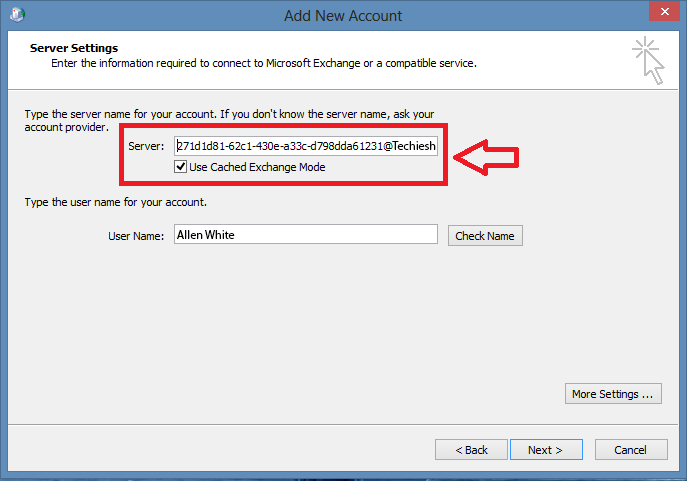
numbers infront of server name exchange 2013

Microsoft Outlook clients no longer connect to your servers fully qualified domain name like they used to. Outlook uses the Autodiscover service ( and the A record you create in DNS pointing to your CAS server ) to connect to your Exchange 2013 server. this is displayed as the mailbox GUID of the user, the @ symbol, and your domain name of the user’s primary SMTP address.  So do not think that this is a problem, it is in fact by design. http://technet.microsoft.com/library/jj150540%28EXCHG.150%29


Related Problems

Connect Disconnected Mailbox in Exchange 2013
Step by step on how to find a mailbox guid in Exchange 2013 and connect a disconnected mailbox in Exchange 2013
READ SOLUTION
Exchange 2013 Outlook and OWA Search Does Not Work
In Exchange 2013, with OWA or a connected Outlook client when you attempt to search for an email no results are found.
READ SOLUTION
Outlook 2003 Gives Connect To Instance Error When Connecting To Exchange 2010
When you connect to exchange 2010 with outlook 2003 , you may see the error connect to instance. This is a known issue and microsoft have provided a fix
READ SOLUTION
Things to consider if you run Outlook 2003 on Exchange 2010
If you are migrating to exchange 2010 and run outlook 2003 on your clients there are a number of things that must be considered in advance. Read this guide.
READ SOLUTION
Exchange 2013 RPC Client Access Service Restarts
In Exchahnge 2013 you receive the error code Event code: 3005 and the RPC Client Access Service continuosly restarts.
READ SOLUTION
Create A Catch All Mailbox In Exchange 2013
How to ceate a rule that catches all email sent to Exchange that is sent to mispelled users or sent to users that do not exist in your email organization.
READ SOLUTION
Manage Users Outlook Rules In Exchange 2010
If you would like to see what your users actually do with email once they get it then this powershell command enables you to see and check what rules users ...
READ SOLUTION
Exchange 2013 Step by Step Configuration
A comprehensive step by step guide on configuring Exchange 2013 from start to finish. From installation, send connectors, spam and SSL to user creation.
READ SOLUTION
Connect Disconnected Mailbox in Exchange 2013
Exchange 2013 Outlook and OWA Search Does Not
Outlook 2003 Gives Connect To Instance Error When
Things to consider if you run Outlook 2003
Exchange 2013 RPC Client Access Service Restarts
Create A Catch All Mailbox In Exchange 2013
Manage Users Outlook Rules In Exchange 2010
Exchange 2013 Step by Step Configuration

Tags:

Trackback from your site.

Allen White

Allen is a Technical Consultant for an IT company in the North East of England and holds the following accreditations. MCSA, MCSE, MCTS, MCITP, CCA, CCSP, VCP 4,5 and HP AIS - Network Infrastructure. I run this site is my spare time so if I help you then PLEASE take the time to share using the share tools on the site.

Comments (2)

  • WolF

    |

    This is bad. Haw normal people will understand this?

    Reply

  • David

    |

    Hi Allen, this really doesn’t change too much, the only issue I’ve come across is a migration to Exchange 2013.

    If you have Outlook configured already and you migrate the mailbox to Exch 2013, Outlook will kindly prompt and say you need to restart once it’s changed the server name.

    If you connect via Outlook Anywhere it just stops saying the mailbox server is unavailable. The fix was to connect to a VPN, disable Outlook Anywhere allowing Outlook to connect as though it were local and therefore changing the server name to the new address, then enable Outlook Anywhere again.

    Reply

What Do You Think?

Search Solutions

Categories

Ask a Question!

(c) Techieshelp.com. Please be aware, all information is provided freely, any information used is done so at your risk and Techieshelp will not be held responsible for any issue that may occur.