

How To Install The License on ESXI 4.1 and 5.0
IT Problem
You are running esxi 4.1 and want to know how and where you install your license key.When you initially download and install esxi you get a temporary license of 60 days, when it expired you will need to install a valid license. This is simple but if you do not know your way around the esxi console then you may struggle to find it.
IT Solution
Once you have downloaded your copy of esxi you then need to create and account here
once done you will then get access to your license key.
Then , login to the esxi console with the vsphere client and select your host.
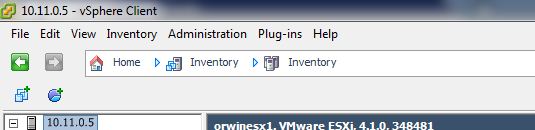
esxi host
Once selected, on the right hand side you will then see the esxi options tabs. Select Configuration.

esxi options
Then down the left hand side select licensed Features.
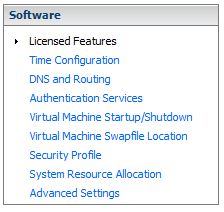
vmware licensed features
On the top right hand side of the screen you will see a small  option, click it. You will then see the assign license popup screen. Select Assign a new license key to this host and enter your key.
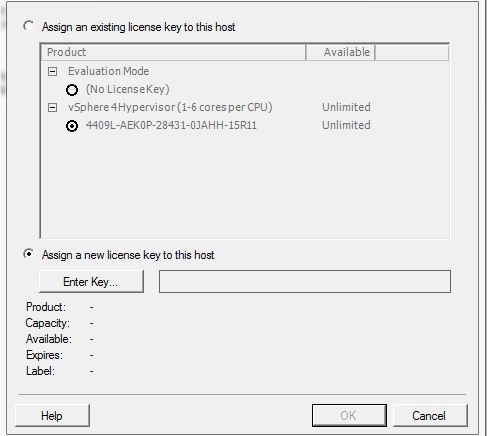
assign vmware license key
Vmware esxi is now licensed.
Tags: esxi

 Loading ...





ken
| #
So I let my trial of ESXi expire (thought I had already applied perm key via vcenter).
When I try to access the ‘edit’ button referenced above, I get an like this – Call “PropertyCollector.RetrieveContents” for object “ha-property-collector” on ESXi “123.123.123.123” failed. (123’s = the IP address of the ESX host). Any clue how to access the edit page in this situation? No other features / pages seem to be impacted…
Reply
admin
| #
I think this is related to where your swap file is…
http://communities.vmware.com/message/1705032
Reply
AT
| #
Can you point me to the +1 please?
I can’t find it
Reply
admin
| #
Hi There, its just aboe your comment ..UNLESS your on chrome, safari or any apple product….google seem to be having problems with compatability at the minute!
Reply
Aaron Stemen
| #
Thank you! I couldn’t figure out how to install the license that VMWare assigned to me, and I didn’t see anything obvious.
Reply