IT Problem
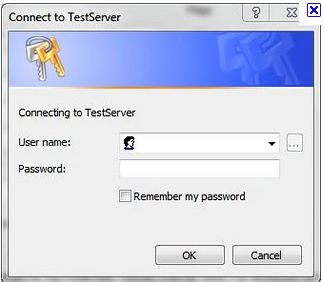
When you run your outlook client you are prompted for authentication again, with the standard authentication box as seen below. This can happen in outook 2003, outlook 2007 and outlook 2010.
IT Solution
This is a quite a common issue and there are a few solutions and ive seen it on a number of IT forums with numerous solutions. Try the solutions below.
1.) First of all this is a known issue with exchange 2007 pre service packA Service Pack is an update to software from the software vendor. Usually a Service Pack is a combination of individual udates that have been released over time, installing in one large service enables less downtime.Sometimes service packs will add new features to the product. 2. If you do not have the latest service packA Service Pack is an update to software from the software vendor. Usually a Service Pack is a combination of individual udates that have been released over time, installing in one large service enables less downtime.Sometimes service packs will add new features to the product. and latest updates installed do this before going any further. Here is a link to service packA Service Pack is an update to software from the software vendor. Usually a Service Pack is a combination of individual udates that have been released over time, installing in one large service enables less downtime.Sometimes service packs will add new features to the product. 3 for exchange 2007
http://www.microsoft.com/downloads/en/details.aspx?FamilyID=1687160b-634a-43cb-a65a-f355cff0afa6&displaylang=en
2.) We next to ne make sure that windows authentication is enabled. So under server manager > Roles > IIS we need to make sure that windows authentication is selected aswell as basic authentication.
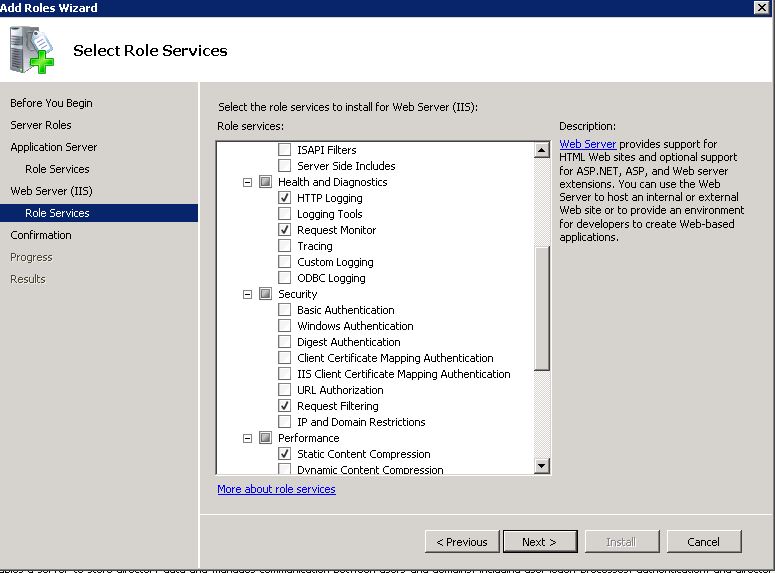
Additional to this, In IISĀ under the virtual directory, Autodiscover properties> Directory Security> Authentication Methods> make sureĀ “Integrated Windows Authentication” is selected.
3) Finally under the below virtual directories. Select them all.
AutoDiscover
RPC
EWS
OABThe Offline Address book is a copy of all the mail enabled contacts, users and objects in the Microsoft Exchange organisation. The OAB is a copy of the Global Address List and all other additional address lists. The OAB is used when an Outlook client is in cached mode, when the Outlook client is not in cached mode it connects directly to the GAL. The OAB is generated once a day from the GAL so if a new user is created then there is a chance that outlook clients that are in cached mode will not get the update until the GAL and the OAB have synced. You can have more than one OAB, the OAB`s are distributed either via public folderA Public Folder is a folder that is stored within Microsoft Exchange on the Public Folder Database. The purpose of Public FoldersA Public Folder is a folder that is stored within Microsoft Exchange on the Public Folder Database. The purpose of Public Folders is so that organisations can create folders to share email and files alike. Public folders can be mail enabled, so they can receive email without any managment.Once the email is in the folder, you can specify who can, read, edit and even see the public folder. is so that organisations can create folders to share email and files alike. Public foldersA Public Folder is a folder that is stored within Microsoft Exchange on the Public Folder Database. The purpose of Public Folders is so that organisations can create folders to share email and files alike. Public folders can be mail enabled, so they can receive email without any managment.Once the email is in the folder, you can specify who can, read, edit and even see the public folder. can be mail enabled, so they can receive email without any managment.Once the email is in the folder, you can specify who can, read, edit and even see the public folder. or via Web ( IIS ). You can also specify via Mailbox Store what OAB a member of the mailbox store will receive. To force an update of the OAB run the PowerShell command Update-OfflineAddressBook YourOABnamehere
Once highlighted select Authentication, right click on Windows Authentication and select Advanced Settings and put a check in the enable kernel-mode authentication.
If anyone is aware of further possible fixes then please comment below.
Related posts:
- OUTLOOK.EXE keeps running after you exit Outlook
- Cannot start Microsoft Office Outlook, Unable to open the Outlook window
- Outlook Web Access unable to send or reply to Mail
- How to Disable an Outlook Add-in Outlook 2010
- Things to consider if you run Outlook 2003 on Exchange 2010