How To Put A Virtual Machine In Safemode
IT Problem
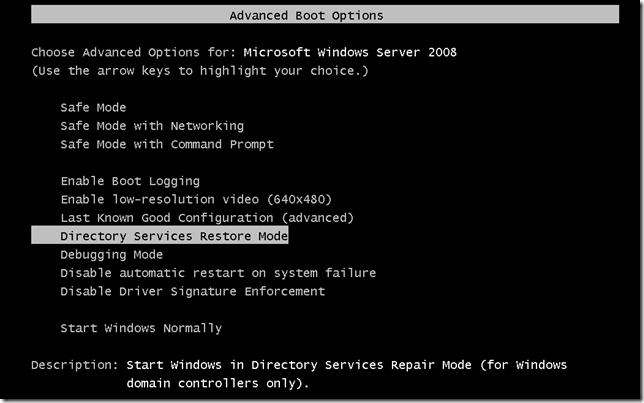
In VMWare Vsphere 4.0, 4.5, 5.0, 5.1 or 5.5 you would like to put one of your Windows virtual machines into safe-mode. Safe-mode is still usefull in a virtual environment as the servers still suffer from services issues etc..The problem we have when putting a virtual machine into safe-mode is that the VM boots so damn fast! Going into safemode is done the same way as normal with F8, HOWEVER, most of the time will not go into safe-mode as you are not quick enough to enter the keystroke. To resolve this you need to change the boot pause so we get more time to catch the F8 option.
IT Solution
This is a simple fix. On your VM host, right click the effected Virtual Machine and select Edit Settings.
At the top of the screen that appears you have three options, select the second called Options.
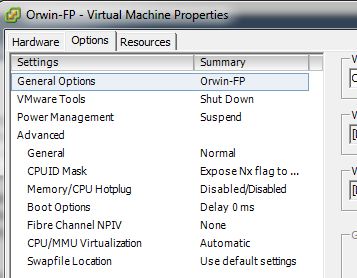
You then need to select Boot Options. Once done on the right you will see the section called Power On Boot Delay.
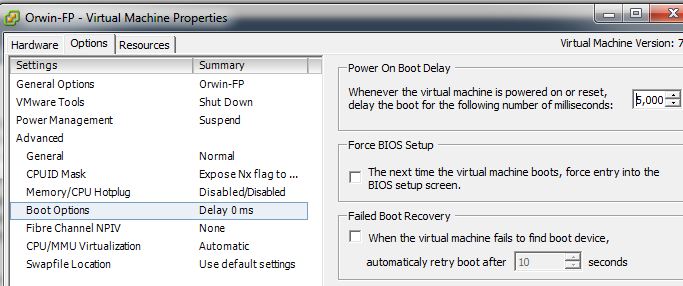
It is in milliseconds so I normally set it to 5000 ( 5 seconds. ). Once done apply it then when you boot your VM, from the console screen you should be able to catch the virtual machine to put it into safe-mode.

 Loading ...