

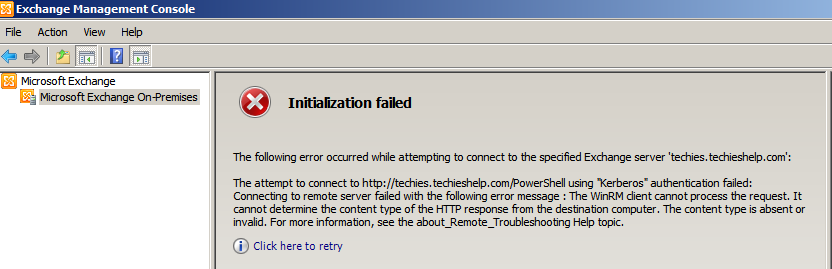
The Attempt To Connect To Powershell Using Kerberos Authentication Failed The WinRM Client Received An Http Server Error Status (500)
After upgrading a Server 2008 server recently that was running Exchange 2010 I came across this error.
There are a few variations of the message also namely this one below.
The Attempt To Connect To Powershell Using Kerberos Authentication Failed The WinRM Client Received And Http Server Error Status (500)
This is down to the WinRM client becoming corrupt. This is an easy fix to do via the exchange powershell console. do the following.
We first need to enable to server manager plug in. To do so run this command
Import-Module ServerManager
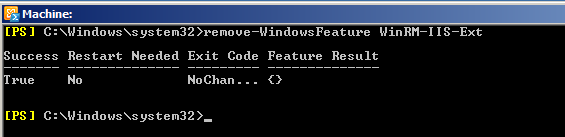
Then run this command te remove the service.
Remove-WindowsFeature WinRM-IIS-Ext
Then we need to reinstall WinRm. To do so run this command as seen below.
Add-WindowsFeature WinRM-IIS-Ext
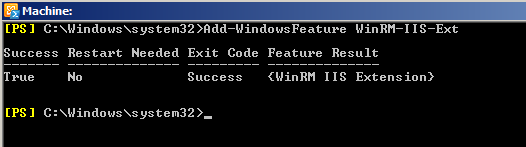
Add-WindowsFeature WinRM-IIS-Ext
You will now find that you can launch the Exchange Management console without any issues, View to video below for a full step by step guide on fixing the “The Attempt To Connect To Powershell Using Kerberos Authentication Failed The WinRM Client Received And Http Server Error Status (500) ” issue.
Tags: emc error 500

 Loading ...




Horatio
| #
I ran those codes and I am still getting the same error message. I even get that error message in the exchange management shell. Any other tricks to fixing it?
Reply
JoshB
| #
I got this error after upgrading 2008R2 Std to Enterprise. Your fix resolved my issue. Thank you.
Reply
Allen White
| #
Glad to help josh…just a note, MS do NOT support exchange 2010 when it is on a server that has been upgraded from 2008 standard to to 2008 enterprise .So if you ever log a support call to MS then it my be wise to “forget” thats happend 😉
Reply
Ayo
| #
This worked for me as well thank you. I just upgraded to Enterprise Server 2008 R2 from Standard and got the error. Thank you
Reply
Leneesh Thoppil Ravi
| #
Hi
I follow your steps I am getting after the command, please see below Error
New-PSSession : Cannot bind parameter ‘ConnectionUri’. Cannot convert value “http:///powershell?serializationLevel=Full
;ExchClientVer=14.1.218.15” to type “System.Uri”. Error: “Invalid URI: The hostname could not be parsed.”
At line:1 char:29
+ New-PSSession -ConnectionURI <<<< "$connectionUri" -ConfigurationName Microsoft.Exchange -SessionOption $so
+ CategoryInfo : InvalidArgument: (:) [New-PSSession], ParameterBindingException
+ FullyQualifiedErrorId : CannotConvertArgumentNoMessage,Microsoft.PowerShell.Commands.NewPSSessionCommand
Reply
knottyrope
| #
fix wont work if your time is off on exchange server from your DC
Reply
Rab
| #
Nice one mate – not often you just paste something in from the internet and it just fixes it. ESPECIALLY not with exchange. well done!
Reply
Pete
| #
I had this issue and realised exchange was still trying to contact decommissioned dc. i was going to try this but first checked ip info, primary dns was set to old dc, amended that, restarted exchange ad topology services and bingo, i was back in. hope this helps someone.
Reply