V-79-57344-3863 – Backup Exec
IT Problem
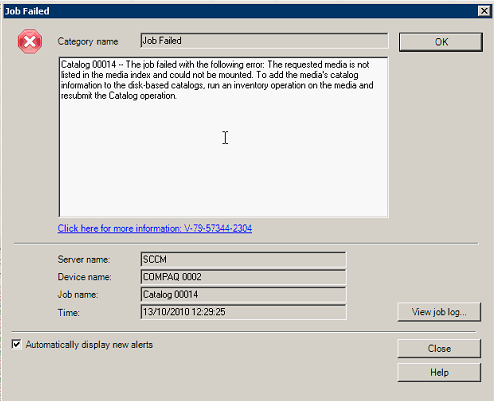
When you run a catalogue job on a tape in backeup exec you see this message
IT Solution
1) Open Symantec Backup Exec Managment Console
2) Then Select Tools and Options
3) In the left column select Catalogue
4) On the right, tick “Use storage media-based catalogs”
5) Click OK and then run the catalogue again.
6) You may want to enable “Use storage media-based catalogs” when done with your catalog
Tags: Bcakup Exec

Allen White
Allen is an IT Consultant and holds the following accreditations. MCSA, MCSE, MCTS, MCITP, CCA, CCSP, VCP 4,5, 6 and HP ASE, AIS - Network Infrastructure.
 Loading ...