Veeam Backup and Replication

Remote Control A PC For Free Access Your PC Anywhere

Written by Allen White on. Posted in General, Microsoft, SBS2008/2011, Server 2003, Server 2008, Windows 7, Windows Vista, Windows XP

IT Problem

If you need to get onto another pc to help someone to give them some remote support then you will find a ton of different solutions. I use an application called team viewer as its free and to be honest excellent. This step by step guide below will show you how to remote control a pc to help someone or simply work on your pc remoteley. You can also transfer files from one pc to another for free.


IT Solution

Download and Install Teamviewer

Ok so first download team veiwer from here then start the install . http://www.teamviewer.com/download/TeamViewer_Setup_en.exe ( you will need to do this on the pc taking control and the pc you want to take control of!!

You will see the screen below. Click next to install.
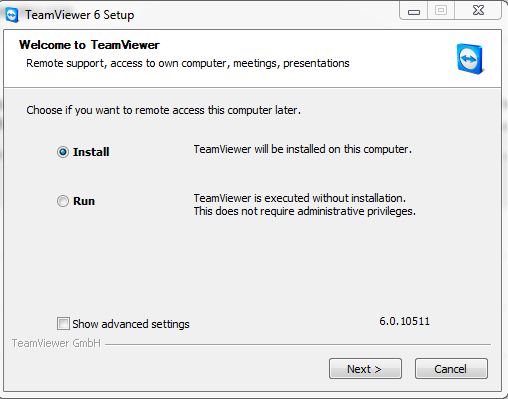
install team viewer

install team viewer


If its for personal use then continue by selecting personal use only.
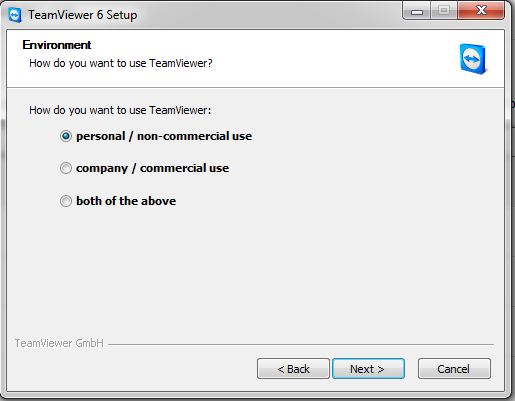
 

install team viewer 2

install team viewer 2


Then you will need to accept all the licensing by popping a tick in both boxes. Then click next.


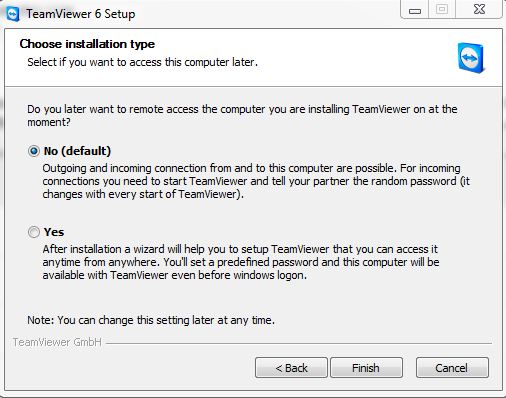
Then next screen asks you of you want to be able to control the pc your installing team viewer from any where, if you do, click yes. If you only want to use teamviewer to control ANOTHER pc then click no. Then click finish. It will install accordingley.


team viewer control

team viewer control


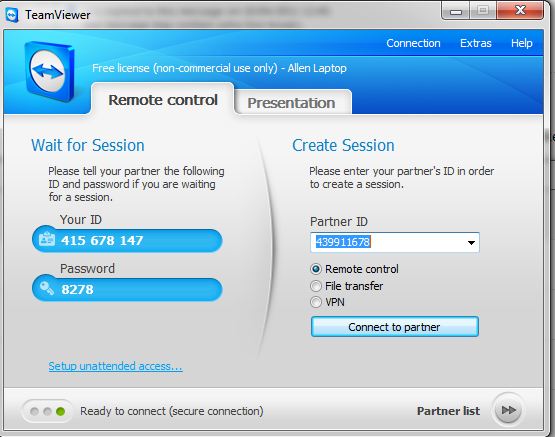
Now that it is installed on both pc`s you will see the screen below. Get the person at the other pc to give you their “partner id” and simply enter into the

teamviewer partner id section. then click connect to partner. it will ask you for a password. The user can also give you that as it is displayed on their teamviewer console screen.

Job done.


run teamviewer

run teamviewer


You can also send files over the teamveiwer console or establish a VPN between the pc`s.


If you selected the option to control your pc anywhere then team viewer will always run on your pc. Now anytime that you need to get onto your pc, you simply run teamviewer from any pc you like then enter the password you specified after install teamviewer on your pc.


Related Problems

Free Hard Drive Space
If your hard drive is running out of space and filling up then its time to clear down your drive. Here are some items you can removed to free up ...
READ SOLUTION
Find Your Fastest External DNS Server – Speed Up Web Browsing
A guide on how to find the fastest DNS server for your pc or server and speed up downloads and web browising.
READ SOLUTION
Step By Step Guide on Upgrading to Internet Explorer 9
If you run a earlier version of internet explorer then you may be considering upgrading to ie9, follow this step by step guide for beginners on upgrading to internet explorer ...
READ SOLUTION
Installing Worry Free Business Client
A guide on how to deploy the worry free business client.How to install the trend worry free business client onto your desktops from the worry free console.
READ SOLUTION
IT Tutorials
DHCP client service won’t start – access denied,You cannot connect to the internet or your domain. This is due to the network service account having incorrect permissions, here is how ...
READ SOLUTION
Notify Users of Server Shutdown
If you need to shut down you server and you need to notify your users of this you can send a message to there screen notifying them of a server ...
READ SOLUTION
Enable the Menu Bar ( favourites ) in Internet Explorer 9 and 10
By default internet explorer is very clean looking. This means no menu bar or favourites bar. Here is how to turn back on the menu bar and favourites bar in ...
READ SOLUTION
It Has Been Too Long Since This Machine Replicated
The time between replications with this source has exceeded the tombstone lifetime.It has been too long since this machine replicated
READ SOLUTION
Free Hard Drive Space
Find Your Fastest External DNS Server – Speed
Step By Step Guide on Upgrading to Internet
Installing Worry Free Business Client
DHCP client service won’t start – access denied
Notify Users of Server Shutdown
Enable the Menu Bar ( favourites ) in
It Has Been Too Long Since This Machine

Tags:

Trackback from your site.

Allen White

Allen is a Technical Consultant for an IT company in the North East of England and holds the following accreditations. MCSA, MCSE, MCTS, MCITP, CCA, CCSP, VCP 4,5 and HP AIS - Network Infrastructure. I run this site is my spare time so if I help you then PLEASE take the time to share using the share tools on the site.

Comments (1)

  • Jim

    |

    just to let you know..
    i worked with TeamViewer and it’s a very reliable tool and definitely fits my needs but a bit too expensive for me.lucky you if you can afford it but if somebody’s suffering the same problem as i am you can use techinline (techinline.com) it’s not bad product and a bit cheaper.
    well,good luck

    Reply

What Do You Think?

Search Solutions

Categories

Ask a Question!

(c) Techieshelp.com. Please be aware, all information is provided freely, any information used is done so at your risk and Techieshelp will not be held responsible for any issue that may occur.