Cannot Create Mailbox In Exchange – Property Expression Isnt Valid
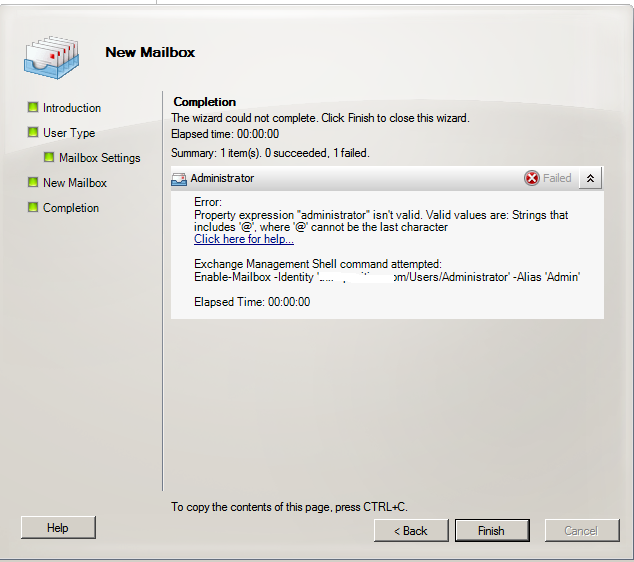
When trying to add a Mailbox to a user in Exchange 2010 or Exchange 2007 you may come across the following error.To view a video of the solution head to the end of the article.
Property expression “Administrator” isn`t valid.Valid strings are.Strings that
includes `@` cannot be the last character
As seen here.
This is because in AD the users User Logon Name is ot assocaited with the FQDN for you domain, if you read the error it actially says it in a roundabout Microsoft way. To fix this do the following.
Go into Active Directory users and Computers the right click the user in question and select properties then Account.
Next to User Logon Name you will see a drop down menu. Select it and then select your domain.
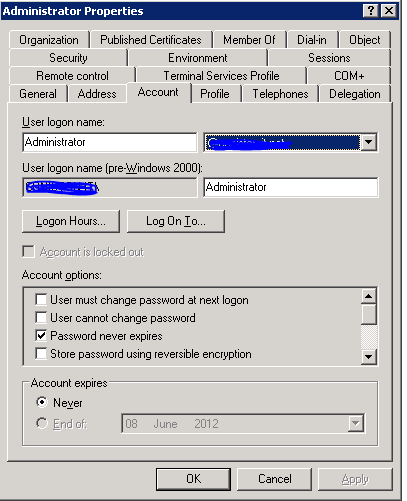
Now when you try and add a mailbox to your user you will be able to complete the task successfully.
Related Problems
A guide on how to create a user in powershell and how to create a mailbox in powershell step by step
READ SOLUTION
ActiveSync Stops Working After Migrate From Exchange 2003 to Exchange 2010 0x85010014 , this is a permission issue. Resolution here..0x85010014 active sync issue after upgrading exchange 2003 to exchange 2010
READ SOLUTION
Find out your exchange server statistics , what version of outlook do clients connect with and various other microsoft exchange orginization statisitics.Get your exchange server statistics
READ SOLUTION
When moving mailboxes from one exchange server to another you receive an error stating Error: This mailbox exceeded the maximum number of corrupted items that were specified for this move ...
READ SOLUTION
When browsing the Global Address List you see users who do not actually have mailboxes and are not contacts or mail enabled. These can be removed with a quick edit ...
READ SOLUTION
This a quick way of stopping exchange 2010 or exchange 2007 users from seeing your global address lists. Block groups seeing the GAL.Block Users Seeing Exchange 2010 Global Address List
READ SOLUTION
A guide on how to setup exchange 2010 or 2007 to forward email to an external recipient. How to forward email in exchange,
READ SOLUTION
Step By Step Guide on Installing and Configuring Trend Micro Scanmail On Microsoft Exchange 2010.This is a simple process.
READ SOLUTIONCreate a User and Mailbox in Powershell
ActiveSync Stops Working After Migrate From Exchange 2003
What Clients Are Connecting To Exchange?
Error: This mailbox exceeded the maximum number of
Non Exchange Users Showing In Global Address List
Block Users Seeing Exchange 2010 Global Address List
Forward Exchange 2007 or 2010 email to external
Step By Step Guide On Installing Trend Scanmail
Tags: mailbox
Trackback from your site.