


Cannot Install .Net Framework 3.5.1 On Server 2008 – 0x80070643
IT Problem
On an exchange 2010 install I was in the early stages of the install so I had to go through the prerequisites and install .Net Framework 3.5.1 and IIS. So as usual I went to features and put a tick in the .Net Framework 3.5.1 box and away it went. To my surprise I received the error below.
WCF Activation
HTTP Activation
Windows Process Activation Service
Configuration APIs
Application Server: Installation failed
<Error>: Installation failed because a required role service or feature could not be installed.
Web Server (IIS): Installation failed
<Error>: Attempt to install Management Service failed with error code 0x80070643. Fatal error during installation
<Error>: Attempt to install IIS Management Console failed with error code 0x80070643. Fatal error during installation
<Error>: Attempt to install IIS Management Scripts and Tools failed with error code 0x80070643. Fatal error during installation
<Error>: Attempt to install Request Monitor failed with error code 0x80070643. Fatal error during installation
<Error>: Attempt to install Tracing failed with error code 0x80070643. Fatal error during installation
<Error>: Attempt to install Dynamic Content Compression failed with error code 0x80070643. Fatal error during installation
<Error>: Attempt to install Static Content Compression failed with error code 0x80070643. Fatal error during installation
<Error>: Attempt to install IP and Domain Restrictions failed with error code 0x80070643. Fatal error during installation
<Error>: Attempt to install Digest Authentication failed with error code 0x80070643. Fatal error during installation
<Error>: Attempt to install Windows Authentication failed with error code 0x80070643. Fatal error during installation
<Error>: Attempt to install Basic Authentication failed with error code 0x80070643. Fatal error during installation
<Error>: Attempt to install Client Certificate Mapping Authentication failed with error code 0x80070643. Fatal error during installation
<Error>: Attempt to install Request Filtering failed with error code 0x80070643. Fatal error during installation
<Error>: Attempt to install URL Authorization failed with error code 0x80070643. Fatal error during installation
<Error>: Attempt to install IIS Client Certificate Mapping Authentication failed with error code 0x80070643. Fatal error during installation
<Error>: Attempt to install Logging Tools failed with error code 0x80070643. Fatal error during installation
<Error>: Attempt to install Directory Browsing failed with error code 0x80070643. Fatal error during installation
<Error>: Attempt to install HTTP Redirection failed with error code 0x80070643. Fatal error during installation
<Error>: Attempt to install HTTP Errors failed with error code 0x80070643. Fatal error during installation
<Error>: Attempt to install Default Document failed with error code 0x80070643. Fatal error during installation
<Error>: Attempt to install ISAPI Filters failed with error code 0x80070643. Fatal error during installation
<Error>: Attempt to install HTTP Logging failed with error code 0x80070643. Fatal error during installation
<Error>: Attempt to install Static Content failed with error code 0x80070643. Fatal error during installation
<Error>: Attempt to install ISAPI Extensions failed with error code 0x80070643. Fatal error during installation
<Error>: Attempt to install .NET Extensibility failed with error code 0x80070643. Fatal error during installation
<Error>: Attempt to install ASP.NET failed with error code 0x80070643. Fatal error during installation
The following role services were not installed:
As you can see it did not go well. So I then tried just to install .Net Framework 3.5.1 on its own, exact same error. This was not going good considering it was and brand new install of server 2008r2.
IT Solution
Reading the error I noticed the same feature kept coming up as a failure, the
Windows Process Activation Service. So off I went into features and sure enough it was installed.
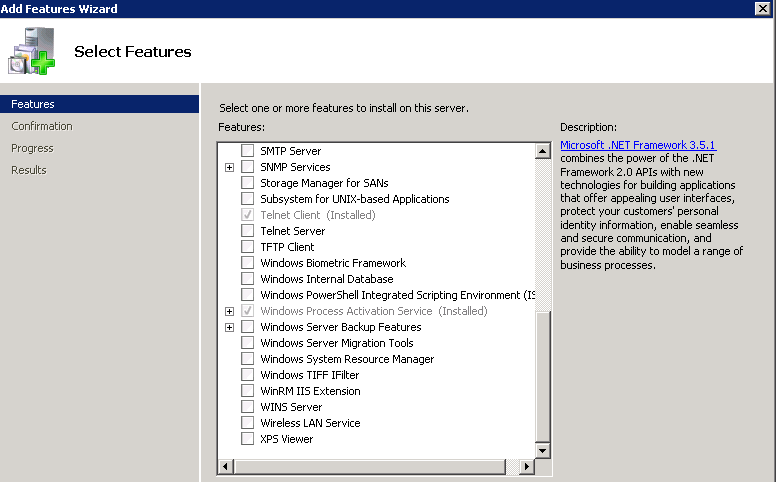
Windows Process Activation Service error
To fix this issue you need to remove the Windows Process Activation Service and the reboot. Once the server has rebooted you can then select .Net Framework 3.5.1 and it will install all of its components successfully.
Tags: .net framwork, exchange 2010

 Loading ...





freestyle
| #
Thank you, I owe you a drink.
Reply
Allen White
| #
Just share the site! that will do.
Thanks
Al
Reply
somatco
| #
In my case that feature is not installed at all and I have the same problem.
Reply
Freebird
| #
After hours of narrowing down the culprit, you put the nail into this issue for me. I was trying to add features to the Application Server role (for Sharepoint 2010), and the 3.5.1 Framework had been installed previously without Non-HTTP WCF. Following your instructions, I removed and then re-added (completely, this time) the Framework along with PAS, successfully. Many thanks!
Reply
mythili
| #
i removed and then re-added completely but same error is coming
: This server might need to be restarted after the installation completes.
.NET Framework 3.5.1 Features
WCF Activation
HTTP Activation
Non-HTTP Activation
Windows Process Activation Service
Process Model
.NET Environment
Configuration APIs
.NET Framework 3.5.1 Features: Installation failed
: Attempt to install Non-HTTP Activation failed with error code 0x80070643. Fatal error during installation
: Attempt to install HTTP Activation failed with error code 0x80070643. Fatal error during installation
The following features were not installed:
WCF Activation
HTTP Activation
Non-HTTP Activation
Windows Process Activation Service: Installation failed
: Attempt to install .NET Environment failed with error code 0x80070643. Fatal error during installation
: Attempt to install Configuration APIs failed with error code 0x80070643. Fatal error during installation
: Attempt to install Process Model failed with error code 0x80070643. Fatal error during installation
The following features were not installed:
Process Model
.NET Environment
Configuration APIs
Please refer to the full log at: ‘C:\Windows\logs\ServerManager.log’
Reply