
Veeam Backup and Replication

The Microsoft Exchange Transport service is rejecting message submissions because the available disk space has dropped below the configured threshold.

Written by Allen White on. Posted in Exchange 2007, Exchange 2010, Microsoft

A client rang in saying that although they could send email out without any issues they where not able to receive email on their exchange 2007 system.This also applies to exchange 2010. A quick inspection noted that the drive that there mail.que file lived on had only a few hundred meg left of space. This was the issue, the Microsoft exchange transport service had stopped because of lack of space.In event viewer you will also see

event ID 15006 stating “the Microsoft Exchange Transport service is rejecting message submissions because the available disk space has dropped below the configured threshold

“.We either had to clear space or move mail.que file to another drive with more spce. So first I cleared down space on the drive and sure enough the Microsoft exchange transport service started correctly and mail started to flow.
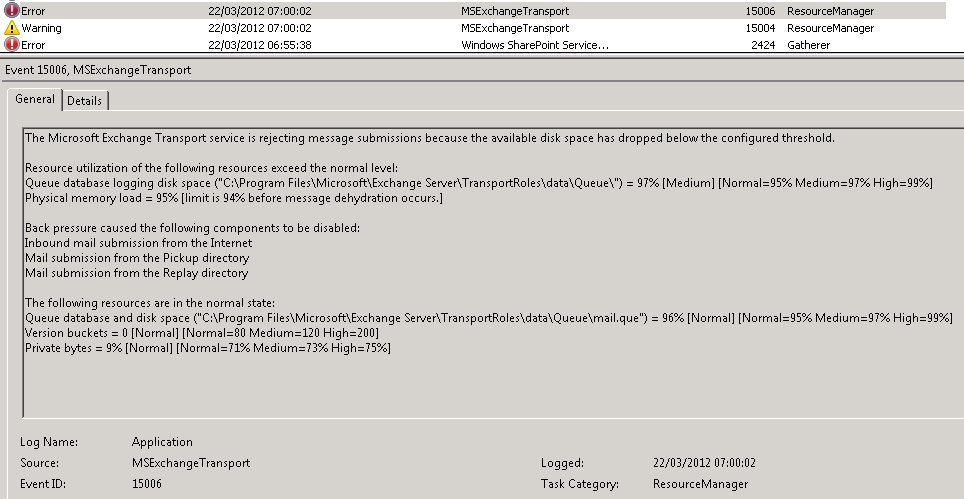
exchange 2007 or 2010 rejecting email submissions becasue the available disk space has dropped

exchange 2007 or 2010 rejecting email submissions becasue the available disk space has dropped


However!, the mail.que file should really have not been on the volume it was so I decided to move it. This is quite a simple process that can be done via powershell as long as you exchange 2007 install is beyond SP1 ( exchange 2010 is fine by default).To do this we use the script named

TransportDatabase.ps1

.


To do so launch exchange powershell, then we need to run the command as seen below.Make sure you are in the scripts folder within exchange.

Move-TransportDatabase.ps1 -QueueDatabasePath: d:\Exchange\TransportRoles\data\Queue -QueueDatabaseLoggingPath: d:\exchange\TransportRoles\data\Queue

Ok, to explain what happens here, the “-QueueDatabasePathgets the current path, then you tell the command where you would like to queudatabasepath, the -QueueDatabaseLoggingPath, again gets the current path then you specify where you want the logs to be stored. This is an automated process so if you require the folders to be created it will do it for you. You will then see the process start and finish, once done email will the start to flow again.


Related Problems

Setup iPad Or iPhone to Connect to Microsoft Exchange 2007,2010 and 2013
A step by step guide on how to connect your apple iPhone or iPad to microsoft exchange server.How to configure mail to connect to exchange
READ SOLUTION
Forward Exchange 2007 or 2010 email to external account
A guide on how to setup exchange 2010 or 2007 to forward email to an external recipient. How to forward email in exchange,
READ SOLUTION
Exchange 2010 not receiving external mail when first installed.
If you have just installed or upgraded to exchange 2010 you may find the you are not receivinging mail, this is a receive connector issue, read this article to resolve.
READ SOLUTION
IT Tutorials
Exchange store will not mount because it cannot see active directory, sites and services issue.error 0x8007077f seen in logs, here is how to fix.Process MSEXCHANGE AD TOPOLOGY SERVICE.EXE
READ SOLUTION
Why Does My Hard Drive Show Less Space Than It Has
A command that will help you find out what user is logged onto a pc/workstation on a network. How to find out who is logged into a pc.
READ SOLUTION
Exchange 2007 / 2010 Distribution groups – Not receiving external mail
You have created a new distribution group in exchange 2010 or 2007 but you are recieving no external mail. How to enable distribution groups for email externally.
READ SOLUTION
Error: This mailbox exceeded the maximum number of corrupted items that were specified for this move request.
When moving mailboxes from one exchange server to another you receive an error stating Error: This mailbox exceeded the maximum number of corrupted items that were specified for this move ...
READ SOLUTION
Exchange 2010 anti spam – enable
A step by step guide on how to enable the anti spam agent in exchange 2010 and 2007. How to stop spam emails in exchange 2007 and 2010.
READ SOLUTION
Setup iPad Or iPhone to Connect to Microsoft
Forward Exchange 2007 or 2010 email to external
Exchange 2010 not receiving external mail when first
Process MSEXCHANGE AD TOPOLOGY SERVICE.EXE (PID=1756). Topology discovery
Why Does My Hard Drive Show Less Space
Exchange 2007 / 2010 Distribution groups – Not
Error: This mailbox exceeded the maximum number of
Exchange 2010 anti spam – enable

Tags:

Trackback from your site.

Allen White

Allen is a Technical Consultant for an IT company in the North East of England and holds the following accreditations. MCSA, MCSE, MCTS, MCITP, CCA, CCSP, VCP 4,5 and HP AIS - Network Infrastructure. I run this site is my spare time so if I help you then PLEASE take the time to share using the share tools on the site.

Comments (1)

  • Exchange 2007 and Exchange 2010, Create New Mail Queue Database

    |

    [...] an issue where a clients Exchange 2007 server`s Microsoft Exchange Transport serviceThe Microsoft Exchange Transport service is an SMTPSMTP or Simpl… with the error message as seen below in the application log in event viewer. Faulting application [...]

    Reply

What Do You Think?

Search Solutions

Categories

Ask a Question!

(c) Techieshelp.com. Please be aware, all information is provided freely, any information used is done so at your risk and Techieshelp will not be held responsible for any issue that may occur.