

Unable to open default email folders, the information store could not be opened..Problem signature: Problem Event Name: BEX
IT Problem
Had this issue yesterday, Server 2008 R2 , running remote desktop services and citrix. The client was only licensed for outlook 2003, so on it went. What happended was 9/10 times when click outlook 2003 the below error would pop up with an option to close and an advanced error section.
Then under the advance error there was further information..
After having a good old rake around and service packing etc etc, I eventually found this solution.
IT Solution
DEP, thats what was breaking it. So first what is DEP..
Data Execution Prevention (DEP) is a set of hardware and software technologies that perform additional checks on memory to help prevent malicious code from running on a system. In Microsoft Windows XP Service Pack 2 (SP2) and Microsoft Windows XP Tablet PC Edition 2005, DEP is enforced by hardware and by software.
So now lets get outlook to be ignored by DEP.
Ill show instructions for 2008 but they are in the same place for server 2003.
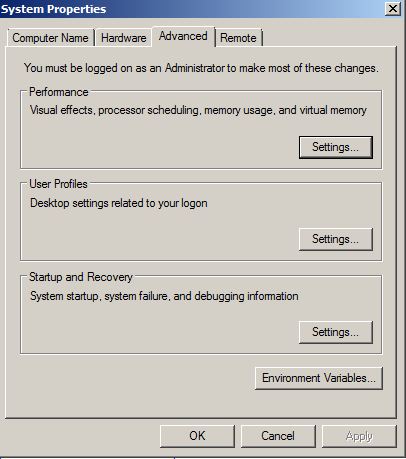
Right Click on computer and then select Advanced system settings. the system properties box will appear, select the 3rd tab named Advanced. You will see the screen below.
Outlook 2003 and dep
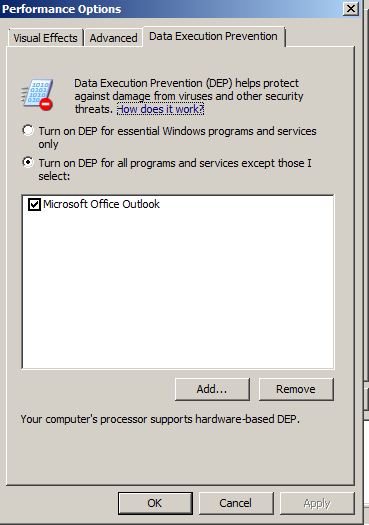
Then select performance and finally the 3rd tab Data Execution Prevention.
Its the just a case of setting Turn On Dep for all services except the applications I select. So browse to the outlook.exe and select it. Then DEP will not check this file.
Unable to open default email folders, the information store could not be opened..Problem signature: Problem Event Name: BEX
You will now find your will see no errors when starting outlook 2003

 Loading ...




İLKER GELİR
| #
Profile change does not solve problem.
While Outlook is running well, an email came and broke down the Outlook.
If you want to see this email, tell me your email address I will send it to you and see what it is
May be you help us in solving this plague.
Reply
admin
| #
email sent 🙂
Reply