It is an indispensable tool for every Exchange Admin that will get you out of a sticky situation

With IE10 OWA 2003 does not display correctly, inbox is displayed incorrectly and the screen is garbled. We can resolve this with compatibility mode.

When migrating mailboxes in various versions of Exchange you see this error Active directory response: 00002098: SecErr: DSID-03150A45, problem 4003 (INSUFF_ACCESS_RIGHTS).
When sending emails to certain domains to youget an error stating #450 4.7.1 Client Host Rejected Cannot Find Your Hostname ##. This is a reverse lookup error.

While migrating from exchange 2003 to exchange 2010 you see mail queus building up between the exchange 2010 server send mail to exchange 2003. The error yuo see is Exchange 2010 Queue 451 4.4.0 Primary target IP address responded with: “451 5.7.3 Cannot achieve Exchange Server authentication. Solution here.
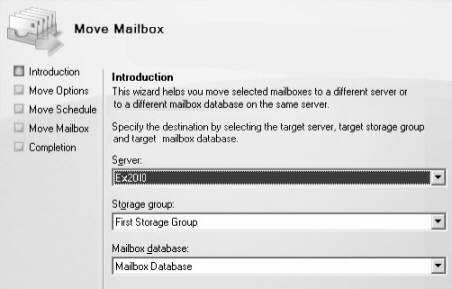
When moving mailboxes from one exchange server to another you receive an error stating Error: This mailbox exceeded the maximum number of corrupted items that were specified for this move request.
After a migration to Exchange 2010 from exchange 2003 you cannot send email to public folders. Solution inside.
ActiveSync Stops Working After Migrate From Exchange 2003 to Exchange 2010 0x85010014 , this is a permission issue. Resolution here..0x85010014 active sync issue after upgrading exchange 2003 to exchange 2010
A guide on how to create a routing group connector between exchange 2003 and exchange 2010, this should be done by default during the install , however it often fails
We need to use the set-emailaddresspolicy cmdlet to set the the exchange 2010 server to be able to manage the recipient policy, run the command in this article to fix this issue. The specified e-mail address policy couldn’t be edited. E-mail address policies created with legacy versions of Exchange must be upgraded using the ‘Set-EmailAddressPolicy’ task, with the Exchange 2010 Recipient Filter specified

A guide on how to Set Exchange 2003 Database limit to 75gb. Byy default the database is 16gb, we can increase that. How to increase exchange 2003 store limits

If you do not have an email client to hand you can send an email via the command line telnet command. Follow this guide on how to send an email from telnet command line.
When installing exchange 2003 service pack 2 you see the following error – Setup failed while installing sub-component Exchange ActiveSync with error code 0xC0070643.This is a problem with MSXML3. Solution inside.
If you want to send emails on behalf of other people then we need to setup the send as and send on behalf permissions in microsft exchange 2010 or exchange 2007. Here is a step by step guide on how to do so.
- 1
- 2
Vote!
 Loading ...
Vote!
Loading ...Read Me
-
Guide to Windows 7 Shortcut Keys
A full list of Windows 7 Shortcuts!, a simple comprehensive list of windows shortcuts. How to complete task in windows without clicking. Windows 7 quick guide.
-
Altaro Free Webinar with Ben Armstrong Principle Manager from Microsoft
Free Webinar with Altaro an Microsofts Ben Armstrong, co creator of Hyper V
-
Cannot Manage Remote Desktop Servers -The servers must be added to the server pool
Remote Desktop Services.The following servers in this deployment are not part of the server pool. The servers must be added to the server pool.
-
VBS Script To Map Users Home Drives With Usernames
Here is a guide on how to create a vbs script to map a users network drive ( home drive ) and label the mapped drive. Step by step guide.
-
Add a Logon Message to Server 2003,2008 and 2012
When your clients logon to your domain you can give them a nice greeting or a company policy notice. Read this guide on how to do so.
-
Server 2012 -Cannot get role and feature data
When installing a role in server 2012 remotely you see the following error Cannot get role and feature data, the user needs remote rights to install roles.